Available 24/7/365
Talk to an Expert
Open 24/7/365

A Step-by-Step Guide to Setting Up VPN for VoIP

landline phone
Written by
Shea Georgetti
Published on
May 11, 2026
Read Time
3
min read time
Loading the Elevenlabs Text to Speech AudioNative Player...

91% of the customers that order from us the Voiply Adapter works out of the box no issues. Our reviews speak for themselves. 100% customer satisfaction is a difficult task to achieve, but we strive to take care of all our customers. The 9% of customers that don't work out of the box usually experience issues out of our control. The way new Internet providers communicate with the public internet over Carrier-Grade Network Address Translation (CGNAT). Essentially it's a technique used by internet service providers (ISPs) to conserve IPv4 addresses and facilitate the sharing of a single IP address among multiple customers. Causing VOIP traffic issues. Traditional providers like Comcast, Verizon, Time Warner all still communicate with a dynamic IP Address. These traditional providers still pose a problem with their routers. Not allow their customers to access the interface to make any changes, blocking VoIP traffic, or enabling SIP ALG without the ability to disable.

Our workaround includes an additional device that will give us the ability to setup a direct VPN connection to our servers. The device is call Opal, this device is available at our store for $40. What does this device do special? This device is considered a travel router, but our use is intended to route over your internet provider traffic over a VPN (Virtual Private Network). This allows us to control the Voiply adapter VoIP traffic right to our SIP Servers. Think of it like this: It's a secret tunnel that lets your Voiply adapter connect to the internet safely. Even if there are problems with T-Mobile or Starlink, or if your internet provider doesn't usually let you change settings on your router, our tunnel makes sure you can still get online easily and securely. Let's get to configuring the device.

Configuring Your VPN and VoIP Settings: A Detailed Walkthrough

Package arrived:
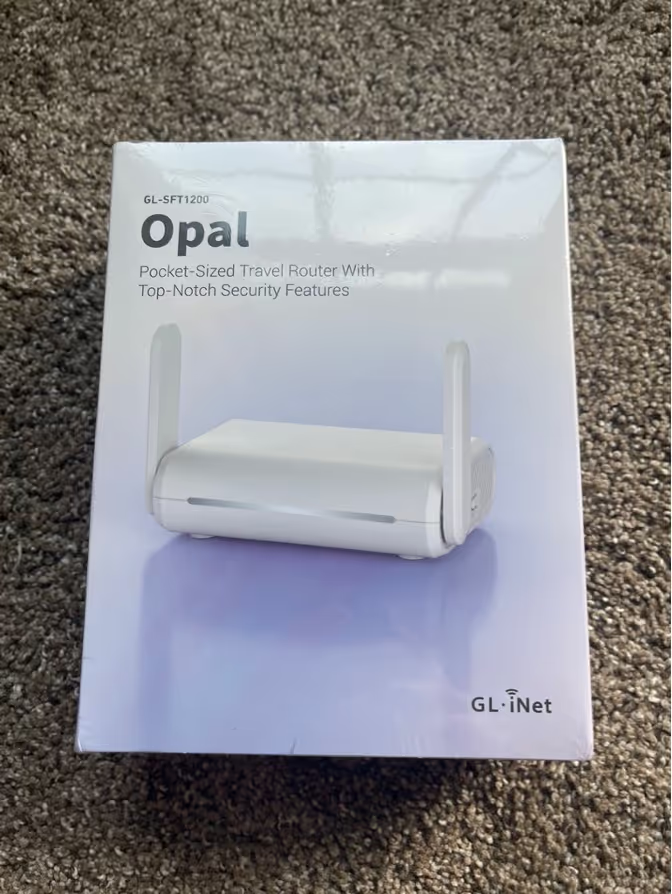
Opal device box

Unboxing the device, you get the quick start guide and how to setup the device.

Opal Device unboxed

There are two different ways to setup the device. Ethernet and Wireless.

Option 1: Via Ethernet

  • Using the ethernet cable plug one end to the WAN port of Opal Device(white box) & other end into LAN port of your router
  • Plug in your Voiply adapter into the LAN port of the Opal Device
  • Plug in Power cord

Head back to your laptop or desktop with a wifi connection. Connect to the SSID on the “setting up” instructions. You will lose internet connection momentarily on your device. Open up your browser and type in https://192.168.8.1. Choose your language and setup a new admin password. You are now inside the new Opal Device and connected via ethernet.

Option 2: Wireless (Repeater)

  • Plug in your Voiply adapter into the LAN port of the Opal Device
  • Plug in Power cord

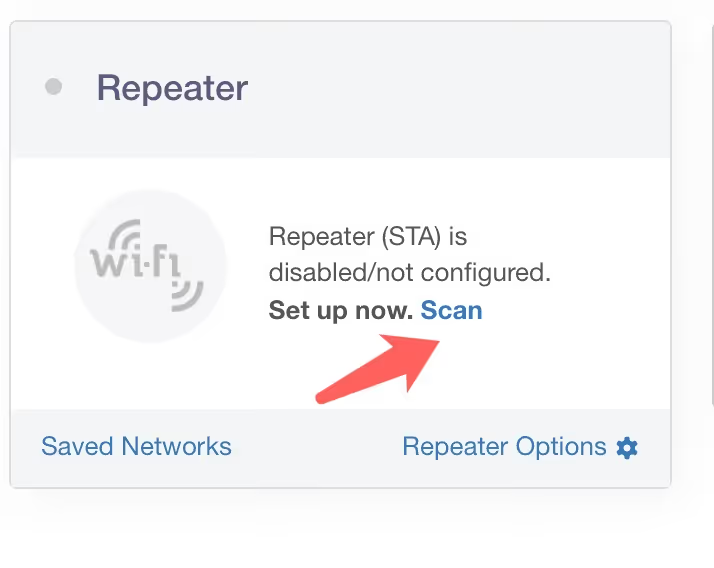
Head back to your laptop or desktop with a wifi connection. Connect to the SSID on the “setting up” instructions. You will lose internet connection momentarily on your device. Open up your browser and type in https://192.168.8.1. Choose your language and setup a new admin password. You are now inside the new Opal Device. To setup the repeater. Go to repeater section and hit scan. Your Wi-Fi connection will show up and connect to your Wi-Fi. You’re now connected via wireless.
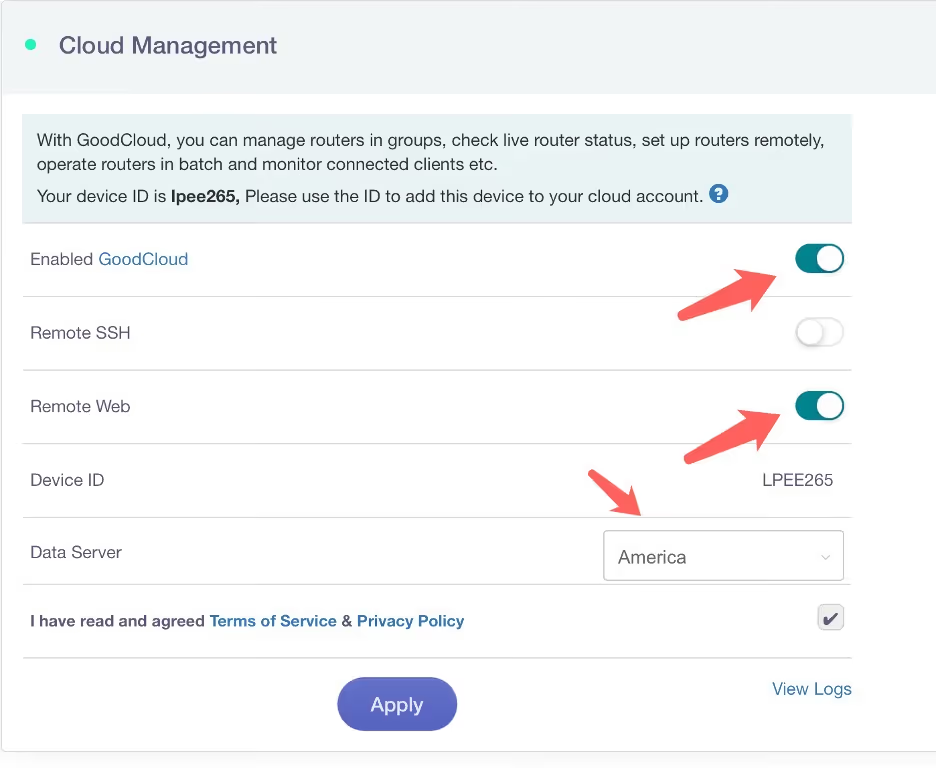
**Important once you're inside the router to go Applications > Remote Access Enabled GoodCloud. This will allow Voiply to finish setting up the VPN connection. Make a note of the MAC/Serial/Device ID of the device. Once you apply the settings below you can now connect back to your original Wi-Fi connection.**
Connection Setup Via Wireless Opal LAN to Voiply Adapter.

Once you have completed your setup. Reach out to our CS team who will ensure we see your Opal device online and finish setting up the VPN connection via the GoodCloud connection.

30 DAY
MONEY BACK GUARANTEE
Yealink business desk phone with handset, numeric keypad, navigation buttons, and monochrome display showing time and date.
Budget Friendly
Number Parking Service
(starting at $1.67/mo)
Check Circle Icon

SMS to Email

Check Circle Icon

Announcements

Check Circle Icon

Voicemail to Email

Check Circle Icon

Call Forwarding

Check Circle Icon

Toll Free / Vanity Number

Get Your Quote
30 DAY
MONEY BACK GUARANTEE
Yealink business desk phone with handset, numeric keypad, navigation buttons, and monochrome display showing time and date.
Smart & Scalable
Business Phone Service
(starting at $14.13/mo)
Check Circle Icon

Free Desk Phone

Check Circle Icon

Desktop & Mobile Apps

Check Circle Icon

Local and Toll Free Numbers

Check Circle Icon

Voicemail to Email

Check Circle Icon

Text Messaging

Check Circle Icon

Unlimited Calling

Get Your Quote
30 DAY
MONEY BACK GUARANTEE
Smiling boy holding a soccer ball and talking on the phone with a text message overlay saying, 'Brian, can we hit the ball this afternoon?'
Budget Friendly
Kids Phone Service
(starting at $7.46/mo)
Check Circle Icon

No Apps. No Texts. No Distractions.

Check Circle Icon

No Strangers Allowed

Check Circle Icon

Quiet Time Protected

Check Circle Icon

Unlimited Calling

Check Circle Icon

Emergency-Ready

Get Your Quote
30 DAY
MONEY BACK GUARANTEE
Set of three black Panasonic cordless phones with digital displays and a charging base featuring Bluetooth functionality.
Budget Friendly
Home Phone Service
(starting at $7.46/mo)
Check Circle Icon

Unlimited phone service

Check Circle Icon

Keep your existing number

Check Circle Icon

Free adapter & free shipping

Check Circle Icon

No contracts/setup fees

Check Circle Icon

Use existing analog phone

Get Your Quote
30 DAY
MONEY BACK GUARANTEE
Rotary phone
Budget Friendly
Home Phone Service
(starting at $8.95/mo)
checkmark

Unlimited Phone Service

checkmark

Keep Your Existing Number

checkmark

Free Adapter, Free Shipping

checkmark

No Contracts/Setup Fees

checkmark

Use Existing Analog Phone

Get Your Quote
30 DAY
MONEY BACK GUARANTEE
Yealink business desk phone with handset, numeric keypad, navigation buttons, and monochrome display showing time and date.
Budget Friendly
Online Fax Service
(starting at $9.99/mo)
Check Circle Icon

Desktop and Mobile App

Check Circle Icon

Email To Fax

Check Circle Icon

Dedicated Fax Number

Check Circle Icon

Easily Fax Documents

Check Circle Icon

No Contracts/Setup Fees

Get Your Quote
30 DAY
MONEY BACK GUARANTEE
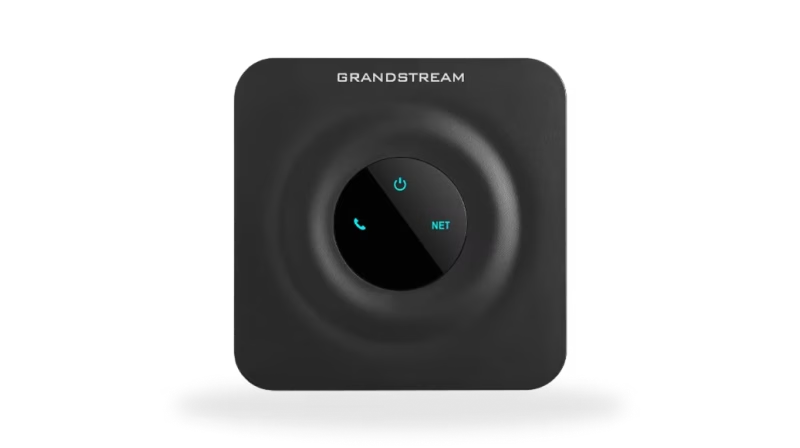
Black Grandstream device with a circular center panel displaying power, phone, and network icons illuminated in blue.
Budget Friendly
Online Internet Service
(starting at $16.95/mo)
Check Circle Icon

Flexible Plans

Check Circle Icon

Everywhere Connectivity

Check Circle Icon

High-Speed Internet on the Go

Check Circle Icon

Reliable Internet Connection

Check Circle Icon

Easy Setup and Access

Get Your Quote
Cartoon of Shea Georgetti
Shea Georgetti
Shea Georgetti is a co-founder and CEO at Voiply, where he leads a team dedicated to transforming communication in businesses. Inspired by books like Atomic Habits, The One Thing, and Goodbye Things, Shea values patience and positivity.
Co-founder and CEO
Why Voiply
LOW-COST PLANS

Why choose Voiply?

Discover affordable VoIP solutions that guarantee exceptional quality and features.

Our cost-effective plans effortlessly retain your current number or facilitate the acquisition of a new one.

We seamlessly streamline the porting process, enabling a seamless transition from your traditional home phone service to our advanced VoIP platform without any disruption in service.

Talk to an Expert at (844) 843-4175

Take your internet anywhere with Voiply Internet

Ideal for RVs, camping, second homes, or rural homes and businesses. Flexible pricing starts at $16.95. Only pay for what you use.

Talk to an Expert at (844) 843-4175

REVIEWS

What Real People Say About Us?

Experience why Voiply has become the top-rated home phone provider, trusted by over 50,000 satisfied customers.

Voiply is an internet based low cost alternative to a land line which we keep because it's the phone my husband will reliably answer and where we get calls from old friends. It has not been without issues, but their service is really good at resolving them. I am happy with their service and will continue to use Voiply. I particularly like that they transcribe voicemails and send them to my email.
S Emmons Profile Photo
Susan Chapman
June 20, 2026
We switched to Voiply after our current VOIP provider increased our rates 60% without warning (and we had been with them for over a decade). What a difference! They helped immediately with porting issues then fixed the mobile app so that we could get incoming calls. We were up and running within a day of the port completion. Our previous VOIP provider took days to fix an issue - Voiply fixed problems within minutes of our report. So customer support definitely gets five stars from us! The Voiply price is also more reasonable so that was very helpful. And both the web interface and mobile app were well written (I'm a software consultant/developer). I've added a picture of the Grandstream device that Voiply supplies for free. Besides power, it has inputs for a phone (RJ11) and an ethernet connection (RJ45). It is programmed to get a DHCP address on your internal network so be sure to allot some addressed on your firewall router for DHCP. We are glad that we ported to Voiply - what a difference from our previous supplier.
S Emmons Profile Photo
Robert Ingham
June 19, 2026
I found Voiply via a Google search for low cost VOIP service providers. I wanted to switch from a current more expensive provider that never responds to calls or emails. After reviewing the websites of the various providers, I decided to give Voiply a call. The first thing that I was impressed by was how quickly they answer the phone. They answered all my questions, so I signed up easily from their website. The app is very intuitive and I was up and running in minutes. I had one small provisioning issue and I entered a ticket on the web. Within an hour or two, the issue was resolved with follow up text messages, emails and a call from tech support. It doesn't get any better than that. You guys knocked it out of the park! Keep it up Voiply family :)
S Emmons Profile Photo
Jim Grason
June 12, 2026
Overall, great value for the money. Incredibly responsive customer support. Pretty easy to use on mobile. I'd say the mobile app could still improve though. Photos come through as a hyperlink you have to click, and no way to send photos. And you can't copy and paste messages. But again, for the money, great value for the solopreneur or small business.
S Emmons Profile Photo
Eve Evans
June 9, 2026
We tried Voiply because the prices were very competitive. But the customer support is why I am leaving this review. Our rotary dial phone needed a little extra configuration so the older technology worked with the adaptor. Customer support was immediately responsive and persistent until a resolution (and a working rotary phone!) was achieved. I appreciated how Voiply didn't shy away from supporting a niche request.
S Emmons Profile Photo
Steph Miller
May 21, 2026
Voiply was the most competitive residential VOIP provider I could find. So far (a few months), they've been very efficient and responsive. Voice quality is very good and features are robust. Easy to set up and half the price of AT&T VOIP (1/5 of a landline). Just be sure you have at least 24 hr. power backup for your VOIP adapter and modem/router in case of a blackout.
S Emmons Profile Photo
Dennis Cline
March 8, 2026
I really wanted a home phone instead of only a cell phone, and Voiply offered the perfect service. The price is reasonable and the service is exceptional; when I experienced technical issues recently, the help was immediate and thorough. My issue was solved in less than a day, and the service representative followed up personally to make sure everything had turned out alright.
S Emmons Profile Photo
Jason Gelt
February 27, 2026
I was with another voip company for a few years. It was a disaster. I finally found VOIPLY and signed on. After being with VOIPLY for more than two years, I am thrilled to say that it is wonderful to speak to a human for great customer service. I get international calling free to most countries as well. They have great plans to suit everyone.
S Emmons Profile Photo
Diane N
February 24, 2026
I switched to Voiply 2 years ago to cut costs, but now I wouldn’t go back to my old phone service even if it were cheaper. The few times I have needed to reach out to support (mostly user error!) they have been very knowledgeable, professional, and quick to identify and correct the issue. And now I have service anywhere with an internet connection or cell signal. Super convenient on my cell or laptop when I’m rarely at home, but my elderly father in law still can use the regular phones too. And the email transcripts of voicemails is a lifesaver! Not a single complaint except wish I had switched sooner. And call quality is NOT like old school VOIP, it is never choppy or dropping calls, sounds better and clearer and more reliable than my old landline service. Recommend 100%
S Emmons Profile Photo
Heather Greer
February 5, 2026